Mechanical Keyboard Switches Explained: Linear, Tactile, and Clicky
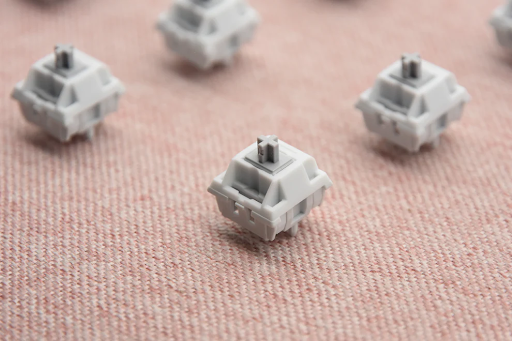
If you’re new to mechanical keyboards, the switch is the single most important decision you’ll make. The switch determines how your keyboard feels, how loud it is, and — to a large degree — how much you enjoy typing on it.
At a high level, all mechanical switches fall into three categories: linear, tactile, and clicky. Here’s what each one means and which type is right for you.
The Anatomy of a Mechanical Switch
Before we compare types, it helps to understand what’s inside every mechanical switch:
- Stem — The moving part that connects to the keycap. This determines the switch type.
- Spring — Provides resistance. Determines actuation force.
- Housing — The plastic shell that holds everything together.
- Contact leaves — Metal pieces that complete the electrical circuit when the key is pressed.
All mechanical keyboard switches work on the same basic principle: press the key, the stem moves down, the contacts touch, and the keystroke registers.
Linear Switches
Linear switches move in a straight, smooth line from top to bottom. No bump, no click — just a consistent pressing motion.
Feel: Silky smooth, consistent resistance throughout the press
Sound: Quiet — just the stem sliding and the keycap bottoming out
Force: Typically 45g–60g actuation
Popular examples: Cherry MX Red (45g), Gateron Red (45g), Cherry MX Black (60g), Gateron Yellow (50g), Kailh Box Red (45g)
Who Are Linear Switches For?
- Gamers — The smooth, fast action makes rapid double-taps easier
- People who share an office — Linear switches are the quietest mechanical option (especially if lubed)
- Typists who press keys lightly — No tactile bump means less finger fatigue at low speeds
- Enthusiasts building “thocky” boards — Lubed linear switches in a foam-filled case produce that sought-after deep sound
The Linear Experience
Type on a linear switch and you’ll notice: there’s no feedback telling you when the key has registered. You press, and the key just… goes down. Some people find this smooth and satisfying. Others feel “lost” without the physical confirmation of a bump.
Tactile Switches
Tactile switches have a noticeable bump partway through the press. This bump is the physical feedback that tells you the key has registered — without needing to press the key all the way to the bottom.
Feel: Smooth start → bump at actuation → smooth finish
Sound: Quiet with a bump thud, slightly louder than linear
Force: Typically 45g–65g actuation (bump occurs at ~40–55g)
Popular examples: Cherry MX Brown (45g), Gateron Brown (45g), Cherry MX Clear (65g), Holy Panda (62g), Kailh Box Brown (50g)
Who Are Tactile Switches For?
- Typists — The tactile bump gives you confidence that each keystroke registered
- People transitioning from membrane keyboards — The bump feels familiar and provides feedback
- Programmers and writers — Anyone who spends hours typing benefits from the tactile feedback
- Versatile users — Tactile switches work well for both typing and gaming
The Tactile Experience
The bump varies significantly between different tactile switches. Cherry MX Browns have a very subtle bump (many enthusiasts call them “scratchy linear switches”). At the other end, Holy Pandas have a sharp, pronounced bump that you can feel through the entire keystroke.
If you’re new to mechanical keyboards, a medium-tactile switch like Gateron Brown is a safe starting point.
Clicky Switches
Clicky switches are tactile switches with an added sound effect. Inside the switch, a separate mechanism creates an audible “click” at the actuation point — on top of the physical bump.
Feel: Smooth start → bump + click at actuation → smooth finish
Sound: Loud, crisp click at each keystroke
Force: Typically 50g–70g actuation
Popular examples: Cherry MX Blue (60g), Gateron Blue (55g), Kailh Box White (50g), Kailh Box Jade (60g), Razer Green (60g)
Who Are Clicky Switches For?
- Typists who love auditory feedback — The click confirms every keystroke
- People with a private office — These are loud. Very loud.
- Retro enthusiasts — Clicky switches replicate the sound of vintage IBM Model M keyboards
- Anyone who wants to annoy their coworkers (please don’t)
The Clicky Experience
Clicky switches are divisive. Some people love the satisfying, typewriter-like sound. Others find it exhausting after 30 minutes. If you share a workspace or take video calls, clicky switches are almost certainly not for you.
Comparison Table
| Feature | Linear | Tactile | Clicky |
| Feel | Smooth throughout | Bump at actuation | Bump + loud click |
| Sound | Quiet (lubed) / Moderate | Moderate | Loud |
| Actuation Force | 45–60g | 45–65g | 50–70g |
| Typing | Medium | Excellent | Excellent |
| Gaming | Excellent | Good | Fair |
| Office Friendly | Yes (lubed) | Yes | No |
| Beginner Friendly | Medium | Yes | Yes (if you love the sound) |
Factors Beyond Type
Actuation Force
Measured in grams (g). Lighter switches (45g) are easier to press and faster for gaming. Heavier switches (65g+) reduce typos but increase finger fatigue.
- Light (< 50g): Cherry Red, Gateron Yellow — fast, minimal effort
- Medium (50–60g): Gateron Brown, Cherry MX Blue — good balance
- Heavy (65g+): Cherry MX Clear, Kailh Box Jade — deliberate, reduces typos
Switch Material
Most switches have POM (polyoxymethylene) stems which are self-lubricating. Cheaper switches may use nylon or other plastics. Premium switches use better materials and tighter tolerances for smoother operation.
Hot-Swap vs Soldered
If your keyboard is hot-swappable, you can change switches without soldering. This is an excellent feature for beginners who want to experiment with different switch types. Check out our keyboard switches for compatible options.
Which Switch Should You Get?
| You Are… | Recommended Switch |
| A gamer who wants the fastest response | Linear (Cherry Red or Gateron Yellow) |
| A writer who types all day | Tactile (Gateron Brown or Holy Panda) |
| New to mechanical keyboards | Tactile (Gateron Brown — safe all-rounder) |
| Someone with a private office | Clicky (Cherry MX Blue or Kailh Box White) |
| Sharing an office or room | Linear lubed (Gateron Yellow lubed) |
| Building a “thock” dream keyboard | Linear lubed (Gateron Black or Oil King) |
| On a budget | Gateron switches — excellent value |
The Best Advice: Buy a Switch Tester
Reading about switches is useful, but nothing beats trying them yourself. A switch tester with 4–9 different switches costs $10–20 and will save you from buying a whole board of switches you don’t like.
Ready to find your switch? Browse our full selection of keyboard switches to find the perfect feel for your build.