What Is a GM Tech 2 Scanner? Full Guide for 2026
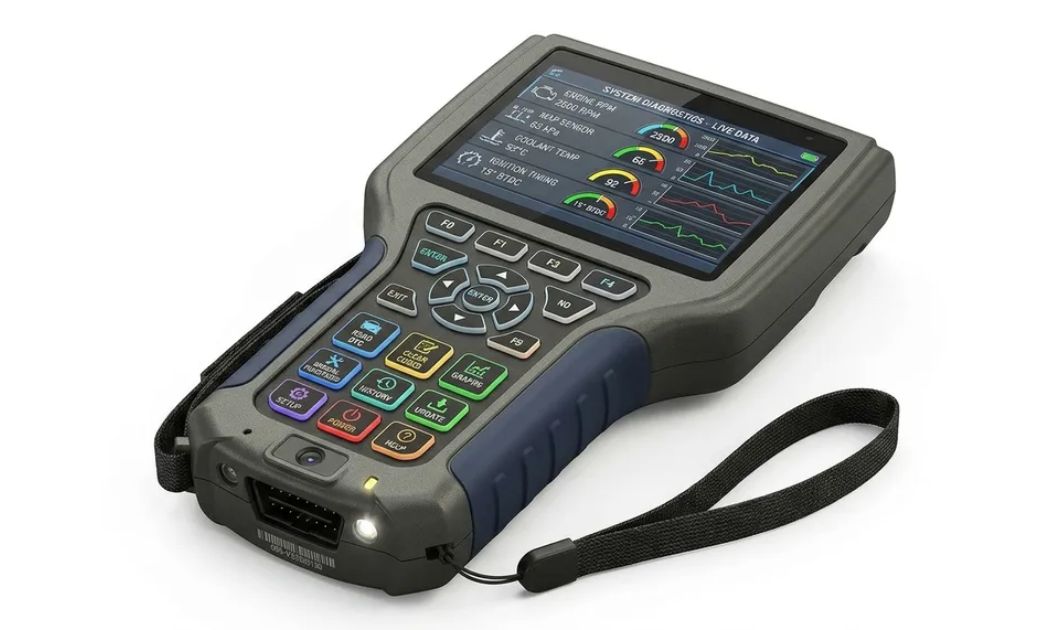
If your check engine light keeps coming on and your basic code reader only shows a generic number, you’ve probably hit the limit of consumer-grade tools. That’s exactly the gap the gm tech 2 scanner was built to fill. For nearly two decades, it was the factory diagnostic tool GM dealerships trusted to talk to almost every electronic module in a vehicle, not just the engine.
- What Is a GM Tech 2 Scanner?
- A Brief History Worth Knowing
- Which Vehicles Does the GM Tech 2 Scanner Support?
- Does It Need a Memory Card? (Yes, Here's Why)
- What Is the CANdi Module, and Do You Need One?
- Core Functions of the GM Tech 2 Scanner
- Real-World Example: ABS Bleeding and VES Reset
- How to Use a GM Tech 2 Scanner (Basic Workflow)
- GM Tech 2 Pricing and Where to Buy
- Is the GM Tech 2 Still Worth Buying in 2026?
- GM Tech 2 vs. Modern Alternatives
- Conclusion
- FAQs
This guide breaks down what the GM Tech 2 scanner actually does, which vehicles it works with, how the memory card and CANdi module fit in, what it costs today, and where it stands against newer tools.
What Is a GM Tech 2 Scanner?
The Tech 2 is a handheld, factory-style scan tool originally developed for General Motors and its affiliated brands. Unlike a simple OBD2 code reader, it communicates with numerous vehicle modules, not just the engine ECU. That means it can reach into the transmission, ABS, airbag, body control, and instrument cluster systems on supported models.
It was never sold to the general public the way a basic code reader is. Dealership technicians and independent repair shops used it daily because it offered factory-level access that aftermarket tools at the time simply couldn’t match.
A Brief History Worth Knowing
The origin story adds real credibility to why this tool still matters. According to Tech2Wiki, the original GM Tech2 was made by Hewlett Packard and used Vetronix software, and Vetronix later purchased the manufacturing rights from HP. In 2003, Vetronix was acquired by ETAS, a developer of standardized diagnostic tools for electronic control units, and in 2006, the Vetronix Aftermarket division merged with Bosch Automotive Aftermarket.
That lineage of HP engineering, Vetronix refinement, and eventual Bosch ownership of the aftermarket side is part of why the device earned a reputation for durability that few diagnostic tools from that era can match.
Which Vehicles Does the GM Tech 2 Scanner Support?
This is one of the most searched questions, and the answer depends entirely on the software card installed. The GM Tech 2 is a professional-grade OBD1/OBD2 diagnostic scanner designed specifically for General Motors vehicles from 1992 to 2013.
Beyond core GM brands, the tool’s reach is wider than most people expect:
| Brand | Approximate Year Coverage | Software Card Needed |
| Chevrolet, GMC, Cadillac, Buick, Pontiac | 1992–2013 | GM card |
| Saab | 1998–2012 | Saab card |
| Opel | 1997–2014 | Opel card |
| Isuzu | 1996–2013 | Isuzu card |
| Suzuki | 2001–2006 | Suzuki card |
| Holden | 1997–2013 | Holden card |
It was heavily used by dealerships and professional repair facilities for Chevrolet, GMC, Cadillac, Buick, Pontiac, Hummer, Saturn, Saab, Opel, Isuzu, Suzuki, and Holden models, depending on the installed software card.
For GM-specific vehicles, the same software typically supports multiple regional languages. GM software is available in English, Spanish, German, Japanese, French, Italian, Portuguese, Korean, and Chinese, generally covering 1991 to 2014 models.
Does It Need a Memory Card? (Yes, Here’s Why)
A common point of confusion for first-time buyers is realizing the scanner doesn’t arrive ready to use. The GM Tech 2 requires a memory card to store diagnostic software, and most packages use a 32MB card. Tech 2 hardware alone is insufficient; the diagnostic software must be loaded onto the memory card.
A few practical points worth knowing before you buy:
- One card, one brand at a time. A single device typically ships with one 32MB card as the default, and additional cards must be purchased separately for other brands.
- Check if it’s pre-tested. Reputable sellers install the software on the card and test it with the machine before shipping to ensure a working scanner arrives.
- Confirm what’s included. Beyond the card, a complete package should include the OBD cable, power adapter, and the TIS2000 software disc, since the device comes with two CDs covering TIS2000 software and the user manual, while the actual diagnostic data lives on the 32MB card.
What Is the CANdi Module, and Do You Need One?
If you’re shopping for newer GM vehicles, this question matters a lot. The CANdi (Controller Area Network Diagnostic Interface) module enhances the Tech 2’s ability to diagnose CAN bus-equipped GM vehicles built in 2006 and later.
The module’s role is specific and important:
- It enables faster communication with modern GM ECUs.
- It supports newer protocols, including CAN and GMLAN.
If you primarily work on pre-2006 GM vehicles, the CANdi module isn’t essential. But for anything from the mid-2000s onward, skipping it will leave entire systems unreachable.
It’s worth noting the CANdi module doesn’t replace older functionality. It’s an in-cable module that works alongside the existing VCI, cables, and adapters, remaining fully backward compatible and operating transparently when diagnosing non-CAN-equipped vehicles.
Core Functions of the GM Tech 2 Scanner
Once it’s set up correctly, the GM Tech 2 scanner becomes a genuinely capable diagnostic platform. Its standout capabilities include the following:
- Real-time data streaming live data from the engine, transmission, and other systems as the vehicle runs.
- Bi-directional control: the ability to send commands to various systems for active testing rather than passive reading.
- Comprehensive trouble code analysis: detailed explanations of diagnostic trouble codes rather than a bare numeric code.
- ECU programming and configuration assistance with programming new ECUs and updating existing software.
- Module resets and relearns, including security systems, TPMS, and steering calibration.
Real-World Example: ABS Bleeding and VES Reset
Two examples illustrate why shops still keep one of these tools around even decades later.
For ABS bleeding, the Tech 2 doesn’t fully automate the process, but it can activate the ABS pump during a manual bleed by entering ABS diagnostics and selecting “Bleed ABS Pump” or “Actuator Test” while the pump cycles. This matters because air trapped in the ABS module requires electronic activation that traditional bleeding alone won’t remove.
For steering systems on a C6 Corvette, the Tech2 can reset and recalibrate the Variable Effort Steering system on 2005–2013 models, using a GM 32MB memory card and the steering angle sensor recalibration procedure in the Tech2 menu.
How to Use a GM Tech 2 Scanner (Basic Workflow)
For anyone setting one up for the first time, the process generally follows a consistent pattern:
- Connect the Tech 2 to the vehicle’s OBD-II port with the ignition on and the engine off.
- Navigate through Diagnostics, then select the Year, Make, Model, and target System such as PCM or ABS.
- For reprogramming, log into GM’s Techline service (TIS2Web) for the latest calibration file, connect the Tech 2, select “Reprogram PCM,” and load the new file while ensuring a stable power supply.
- Cycle the ignition and perform relearn procedures such as idle and throttle relearns once programming finishes.
GM Tech 2 Pricing and Where to Buy
Pricing varies widely depending on whether you’re buying an original unit, a refurbished dealership tool, or an aftermarket clone. Original units with a CANdi module and a tested 32MB card are typically sold through specialty diagnostic retailers and auction marketplaces, while aftermarket clone versions are produced new with multiple language and brand software options pre-loaded.
A word of caution applies regardless of source: extremely low-priced clones should be avoided, as they may lack critical functions. Before purchasing, verify the card is genuinely tested, confirm the cable and power adapter are included, and check that the seller offers some form of support if the unit doesn’t communicate with your vehicle.
Is the GM Tech 2 Still Worth Buying in 2026?
GM officially discontinued the Tech 2 in favor of newer platforms, but that doesn’t make it obsolete for the right use case. It remains best for pre-2013 GM vehicles where it handles full diagnostics and programming, while newer models require GM MDI or J2534 passthrough tools.
Today’s replacement ecosystem looks like this:
- GM MDI (Mobile Diagnostic Interface) + GDS2 is used for 2010 and newer vehicles.
- Tech 2Win, a software emulator that requires a J-2534 interface.
- Aftermarket multi-brand scanners and tools like Autel MaxiSys, Snap-On Solus, or Launch X431 offer broader brand coverage but without GM’s proprietary depth.
For DIY mechanics, a used Tech 2 remains a solid investment, while professionals working on newer vehicles should lean toward GM MDI or GDS2 instead.
GM Tech 2 vs. Modern Alternatives
Conclusion
The GM Tech 2 scanner earned its reputation the hard way: by giving technicians dealership-level access to engine, transmission, ABS, airbag, and body systems years before aftermarket tools caught up. Its dependence on a 32MB memory card and, for newer vehicles, a CANdi module is simply part of how the system was engineered to work across six different GM-family brands.
If you’re maintaining an older Chevrolet, GMC, Cadillac, Buick, Pontiac, Saab, Opel, Isuzu, Suzuki, or Holden, a properly tested Tech 2 with the right card can still outperform many modern generic scanners on depth of access. For newer vehicles, pairing it with GM MDI or transitioning to GDS2 is the smarter long-term move. Before you buy, confirm the card is genuinely tested; ask about the CANdi module if you’re working on 2006-and-newer vehicles; and avoid unusually cheap clones with vague specifications.
For more details on the tech, visit Offeredmagazine.
FAQs
Does the GM Tech 2 scanner need a subscription?
No. The original Tech 2, now discontinued by GM, doesn’t require a subscription, and aftermarket or clone versions don’t carry recurring fees either
Can the GM Tech 2 scanner work without a CANdi module?
Yes, for older vehicles. If you’re working on pre-2006 GM vehicles, the CANdi module isn’t essential, though it’s required for full functionality on CAN bus-equipped models from 2006 onward.
What’s included in a typical GM Tech 2 scanner package?
A standard package includes the scanner unit, OBD cable, power adapter, a 32MB memory card loaded with your chosen brand’s software, and two CDs containing TIS2000 software and the user manual.
Can the GM Tech 2 scanner diagnose Saab vehicles?
Yes. With a hand-held device using PCMCIA cards loaded with software for the appropriate GM-family brand, including Saab, Vauxhall, and Suzuki, the Tech 2 has long been considered essential for Saab diagnostics specifically because Saab’s later models run interconnected bus systems that basic code readers can’t fully read.
Is a used GM Tech 2 still a good investment in 2026?
For pre-2013 GM vehicles, yes. A used Tech 2 remains a great investment for DIY mechanics, though professionals working on newer vehicles should consider GM MDI or GDS2 instead.